See the loadout, GUI & sky in 3D. No download needed.
Description
SWEET AND CANDY [BEDROCK] 🦄
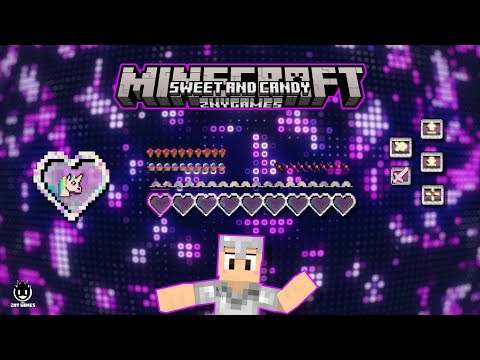
This delightful pack transforms your menu bars, health bars, armor bars, and more into delectable treats, complete with candy icons and heart designs throughout. Whether you're playing in creative, spectator, hardcore, or survival mode, you'll feel like you're in a candy wonderland 🍨. Crafted with love and care, this texture pack ensures an enjoyable and whimsical experience. So what are you waiting for? Get your sugar fix and start playing with Sweet and Candy 🍭!
New! with this pack:
- start screen - controls:
- settings screen - joysick and aim crosshair
- buttons - d-pad and tap
- gui - joystick and tap
- hotbar
___💬| COMMUNITY (っ^▿^)۶🍸🌟🍺٩(˘◡˘ )___
We invite you to join our Discord community where you can connect with fellow players, share your ideas, and report any bugs you encounter. Whether you have suggestions for improving the hotbar or need support with any issues, our community is here to help. Let’s build, explore, and create together!
DISCORD: https://discord.gg/g6vpenZ4x8
YOUTUBE: https://www.youtube.com/@znygames
Sign in to rate this packAdd your stars and help the best packs rise.
0
Rate Pack
Enjoying this pack? Leave a rating and help other players discover it. Every rating you give also earns profile XP toward amazing leveling rewards you can unlock along the way.Enjoying this pack? Rate it to help other players find it. Ratings also earn profile XP toward leveling rewards
(0 ratings)
How to use a Texture Pack:
After downloading your pack, follow these steps to get it working in your game:
Download the .mcpack file from PVPRP
Open the downloaded file and let it import into Minecraft
Go to Settings in Minecraft
Open Global Resources, or open a world and select Resource Packs
Find the pack and click Activate
Press Done and enjoy your new textures
If the file is a .zip, rename it to .mcpack before opening it.



 Pack Video
![Gallery Image 1 for Sweet and Candy [BEDROCK] on PVPRP](assets/packs/znygames/15178/gallery/aarmor.jpg.webp)
![Gallery Image 2 for Sweet and Candy [BEDROCK] on PVPRP](assets/packs/znygames/15178/gallery/agui.jpg.webp)
![Gallery Image 3 for Sweet and Candy [BEDROCK] on PVPRP](assets/packs/znygames/15178/gallery/aguicover.jpg.webp)
![Gallery Image 4 for Sweet and Candy [BEDROCK] on PVPRP](assets/packs/znygames/15178/gallery/astartscreen.jpg.webp)
![Gallery Image 5 for Sweet and Candy [BEDROCK] on PVPRP](assets/packs/znygames/15178/gallery/hub.png.webp)
![Gallery Image 6 for Sweet and Candy [BEDROCK] on PVPRP](assets/packs/znygames/15178/gallery/loading.png.webp)
![Gallery Image 7 for Sweet and Candy [BEDROCK] on PVPRP](assets/packs/znygames/15178/gallery/menu1.jpg.webp)
![Gallery Image 8 for Sweet and Candy [BEDROCK] on PVPRP](assets/packs/znygames/15178/gallery/setting.png.webp)





 Bedrock Edition


![NARUTO [BEDROCK] 16x by znygames on PvPRP](https://pvprp.com/thumb.php?src=assets/packs/znygames/14971/banner.png&w=400)

![Attack On Titan [BEDROCK] 16x by znygames on PvPRP](https://pvprp.com/thumb.php?src=assets/packs/znygames/14946/banner.png&w=400)
![Chainsaw Man [BEDROCK] 16x by znygames & zny games on PvPRP](https://pvprp.com/thumb.php?src=assets/packs/znygames/15376/banner.png&w=400)
![Control Panel [BEDROCK] 16x by znygames on PvPRP](https://pvprp.com/thumb.php?src=assets/packs/znygames/14889/banner.png&w=400)
![LADYBUG [BEDROCK] 16x by znygames & zny games on PvPRP](https://pvprp.com/thumb.php?src=assets/packs/znygames/15396/banner.png&w=400)
![Laboratory XI [BEDROCK] 16x by znygames & zny games on PvPRP](https://pvprp.com/thumb.php?src=assets/packs/znygames/15204/banner.png&w=400)